
If you can’t tell at a glance where the WHERE clause of a 200-line SELECT statement starts and ends, you have a structure problem — not a content problem. This article shows the layout that keeps long statements navigable.
→ Part of a series. This is part 2 and covers statement structure (
SELECT,WHERE,FROM,JOIN). The basics for identifiers, delimiters, commas, and aliases are in Part 1 — Identifiers, Delimiters, Commas, Aliases.
TL;DR — what this article delivers:
- Main elements (
SELECT,FROM,WHERE,GROUP BY,HAVING,ORDER BY) belong on separate lines with consistent indentation. WHEREclause — align operands and operators column-style, indent equivalent constraints equally; the parenthesis structure becomes visually readable.FROMclause — table directly after theJOINoperator,ONkeyword on its own line, JOIN constraints formatted like a miniWHEREclause.- Postgres bridge + auto-formatters at the end —
[brackets]vs."quotes",DISTINCT ON,LATERAL; sqlfluff and pgFormatter as a supplement to manual discipline, not a replacement.
Prerequisite: SSMS or any SQL editor with configurable tab width is enough; a live AdventureWorks database is not required — the examples illustrate patterns, not runnable pipelines.
General Thoughts on Indentation
A useful analogy for SQL structure is the outline of a table of contents. The indented version below is much faster to scan than the flat variant further down:
1. Chapter Level 1
   1.1. Chapter Level 2
      1.1.1. Chapter Level 3
      1.1.2. Chapter Level 3
   1.2. Chapter Level 2
      1.2.1. Chapter Level 3
      1.2.2. Chapter Level 3
      1.2.3. Chapter Level 3
      1.2.4. Chapter Level 3
   1.3. Chapter Level 2
      1.3.1. Chapter Level 3
      1.3.2. Chapter Level 3
      1.3.3. Chapter Level 3
2. Chapter Level 1
   2.1. Chapter Level 2
      2.1.1. Chapter Level 3
      2.1.2. Chapter Level 3
   2.2. Chapter Level 2
      2.2.1. Chapter Level 3
      2.2.2. Chapter Level 3
For comparison, the same TOC flat:
1. Chapter Level 1
   1.1. Chapter Level 2
      1.1.1. Chapter Level 3
      1.1.2. Chapter Level 3
   1.2. Chapter Level 2
      1.2.1. Chapter Level 3
      1.2.2. Chapter Level 3
      1.2.3. Chapter Level 3
      1.2.4. Chapter Level 3
   1.3. Chapter Level 2
      1.3.1. Chapter Level 3
      1.3.2. Chapter Level 3
      1.3.3. Chapter Level 3
2. Chapter Level 1
   2.1. Chapter Level 2
      2.1.1. Chapter Level 3
      2.1.2. Chapter Level 3
   2.2. Chapter Level 2
      2.2.1. Chapter Level 3
      2.2.2. Chapter Level 3
Flat TOCs also work — but only with additional formatting options like upper/lower case, bold, or italic to distinguish levels. In a SQL editor, those options are typically not available (SSMS renders plain text with syntax highlighting, no bold for identifiers). So indentation remains the structural tool.
Main Language Elements
A SELECT statement consists of the following main clauses:
SELECTFROMWHEREGROUP BYHAVINGORDER BY
Treating these as level-one elements, the corresponding level-two elements must be indented per the indentation principle. The resulting basic structure of a SQL statement looks like this:
  1: SELECT
  2:    field list
  3: FROM
  4:    data sources
  5: WHERE
  6:    constraints on data source
  7: GROUP BY
  8:    grouping fields
  9: HAVING
 10:    constraints on aggregations
 11: ORDER BY
 12:    sort fields
In any case, the main elements of a SQL statement should be on separate lines.
As counterexamples, here are two commonly seen formatting styles that ignore this rule. In both, the reader has to read at least parts of the statement to recognize where a main element starts and ends.
Left-Aligned Main and Sub-Elements
You occasionally find both top-level elements and the next-level elements left-aligned in the same column. This shows up especially in the FROM clause: data sources (tables, views, CTEs) are indented the same as the introducing keyword FROM:
  1: SELECT
  2: field list
  3: FROM
  4: table1
  5: JOIN table2 ON [...]
  6: JOIN table3 ON [...]
  7: WHERE
  8: constraints on data source
  9: GROUP BY
 10: grouping fields
 11: HAVING
 12: constraints on aggregations
 13: ORDER BY
 14: sort fields
Right-Aligned Keywords
In this example, the main clauses of the SELECT statement — without regard for the BY keyword — are right-aligned. This indentation style adds extra effort because you have to work with varying indent widths:
  1: SELECT field1, field2, field3
  2:   FROM table1
  3:   LEFT JOIN table2 ON [...]
  4:   LEFT JOIN table3 ON [...]
  5:  WHERE constraint1
  6:     OR constraint2
  7:     OR constraint3
  8:  GROUP BY grouping fields
  9: HAVING constraint1
 10:     OR constraint2
 11:     OR constraint3
 12:  ORDER BY sort fields
 13:  WHERE clause
For simple statements, however, right-aligned keywords can read quite well — CREATE INDEX is a typical example:
1: CREATE UNIQUE NONCLUSTERED<br> 2: INDEX [IndexName]<br> 3: ON [dbo].[FactInternetSalesReason]([SalesOrderNumber] ASC);<br>For full SELECT statements with multiple JOINs, group-by columns and complex constraints, this style breaks down.
SELECT Field List
The natural reading direction of a SQL statement is left to right and top to bottom. With keyboard and mouse, vertical navigation is easier than horizontal navigation. The scroll wheel and the Page Up/Page Down keys make fast vertical navigation possible even within long complex statements — provided that field lists are written vertically.
Field names should be written as a vertical list with leading commas — the detailed reasoning (comma readability, box-selection pattern) is in Part 1, section “The Comma”. One field per line. Because the field list is logically subordinate to the SELECT keyword, field names are indented by the agreed indent width:
  1: SELECT
  2:     field1
  3:    ,field2
  4:    ,field3
  5: FROM [...]
  6: WHERE [...]
  7: GROUP BY
  8:     field1
  9:    ,field2
 10:    ,field3
 11: HAVING [...]
 12: ORDER BY
 13:     field1
 14:    ,field2
 15:    ,field3
WHERE Clause
The WHERE clause is explained here before the FROM clause because the same rules also apply to the FROM and HAVING clauses. A WHERE clause contains one or more constraints connected by logical operators. Two points deserve attention when formatting these constraints:
- alignment of operands
- indentation of equivalent constraints
Alignment of Operands
A simple constraint consists of two operands and an operator (=, !=, <>, IN, NOT IN, etc.). In a compound constraint built from multiple single constraints, operands and operators should be aligned column-style. In the following example, field names have different lengths and different operators are applied:
  1: [...]
  2: WHERE
  3:        T01.[field___1]    =  'something'
  4:    AND T01.[field__2]     <> 1
  5:    AND T01.[field_____3]  NOT IN (1, 2, 3)
  6:    AND T01.[field4]       = T02.[field5]
This produces a table-like notation that allows fast visual navigation within the constraint components.
Indentation of Equivalent Constraints
If the WHERE clause contains more than one constraint, they are connected by logical operators like AND or OR. For complex expressions, parentheses are required to enforce evaluation order. Depending on complexity, you quickly end up with deeply nested structures.
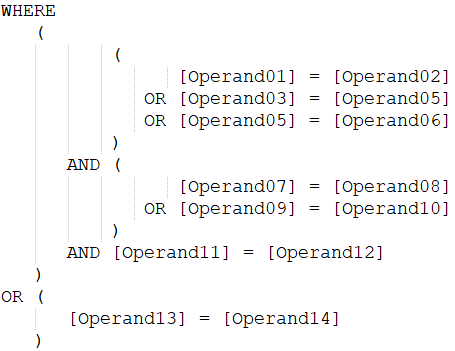
To keep complex nested expressions readable, give particular attention to structure and indentation of the WHERE clause: equivalent constraints are written underneath each other with the same indent, and a logical connection of equivalent constraints uses an indent that matches the evaluation order:
  1: [...]
  2: WHERE    (
  3:           (
  4:                 [operand01] = [operand02]
  5:              OR [operand03] = [operand05]
  6:              OR [operand05] = [operand06]
  7:           )
  8:       AND (
  9:                 [operand07] = [operand08]
 10:              OR [operand09] = [operand10]
 11:           )
 12:       AND [operand11] = [operand12]
 13:    )
 14: OR (
 15:       [operand13] = [operand14]
 16:    )
The logical connections become visually readable through this indentation. A screenshot of the same WHERE clause in Notepad++ makes the effect even more obvious, because the editor’s vertical guide lines at the tab stops emphasize the parenthesis hierarchy:
FROM Clause
As with the other main elements, the subordinate elements of the FROM clause are written indented. In most cases these are data sources — tables, views, and Common Table Expressions (CTEs).
Sub-SELECTs should be replaced by CTEs — readability, reuse, easier debugging. See the FAQ at the end of the article for the punchline and the Postgres specifics (MATERIALIZED / NOT MATERIALIZED).
For formatting a JOIN clause there are four building blocks:
- table (or view / CTE)
JOINoperatorONkeywordJOINconstraints
In the following code example, the reader has no visual anchor to identify the FROM clause elements:
  1: FROM
  2: table1 T01
  3: JOIN table2 T02
  4: ON T01.[FK] = T02.[ID]
  5: JOIN table3 T03 ON
  6: T02.[FK] = T03.[ID]
  7: JOIN table4 T04
  8: ON T03.[FK] = T04.[ID]
  9: WHERE
 10: [...]
The elements of the FROM clause belong on separate lines for readability. Exception: the joined table sits directly after the JOIN operator. The ON keyword sits left-aligned with the JOIN operator on the line below. The same rules as for the WHERE clause apply to JOIN constraints:
  1: SELECT
  2:    [...]
  3: FROM
  4:    table1 T01
  5:    JOIN table2 T02
  6:    ON
  7:      T01.[FK] = T02.[ID]
  8:    JOIN table3 T03
  9:    ON
 10:          T02.[FK1]   = T03.[FK1]
 11:      AND T02.[field2] = T03.[field2]
 12:    JOIN table4 T04
 13:    ON
 14:      T03.[FK] = T04.[ID]
 15: WHERE
 16:   [...]
GROUP BY, HAVING, ORDER BY
The remaining main elements follow the same principles as the SELECT field list and the WHERE clause — in short:
GROUP BYcarries a field list like a smallSELECT— one field per line with a leading comma, indented by convention.HAVINGis a constraint list likeWHERE— operands aligned column-style, equivalent constraints indented equally. The difference is semantic (post-GROUP BYfilter), not typographic.ORDER BYagain carries a field list — analogous toGROUP BY, with optionalASC/DESCper field (held in a separate column when both sort directions appear in the same statement).
  1: SELECT
  2:     T01.[Region]
  3:    ,T01.[Year]
  4:    ,SUM(T01.[Sales])   AS [Total]
  5: FROM
  6:     [dbo].[FactSales] T01
  7: GROUP BY
  8:     T01.[Region]
  9:    ,T01.[Year]
 10: HAVING
 11:        SUM(T01.[Sales]) >= 1000
 12:    AND COUNT(*)         >= 10
 13: ORDER BY
 14:     T01.[Region] ASC
 15:    ,T01.[Year]   DESC
Auto-Formatters and “Formatting Is Learning”
Tools like sqlfluff (multi-dialect — T-SQL, Postgres, MySQL, BigQuery, …) and pgFormatter (Postgres-focused) generate the layouts shown here automatically and are useful as a pre-commit hook or CI step. They are not a replacement for manual formatting.
The act of indenting, aligning aliases and placing parentheses forces the writer to read the statement fully and mentally model the table relationships. Auto-formatters produce the layout — they don’t produce the mental model that emerges while writing. In the age of Copilot and Cursor, this matters twice: generated SQL without understanding is a risk — technically correct queries that don’t answer the business question.
Pragmatic recommendation: format manually first, then let the formatter run as a final consistency pass (e.g. sqlfluff fix).
Postgres Bridge
The layout rules shown in this article are engine-neutral — they apply 1:1 to Postgres as well. There are only a handful of places where Postgres behaves differently, and none of them change the format pattern:
- Identifier quoting: Postgres uses
"double quotes", T-SQL uses[brackets]. ANSI standard is quotes. With case-sensitive identifiers, quoting becomes semantically relevant in Postgres (covered in a separate upcoming article on case sensitivity in SQL Server vs. Postgres). DISTINCT ON: Postgres idiom for “first row per group”. In T-SQL, emulate this withROW_NUMBER() OVER (PARTITION BY …) … WHERE rn = 1. Format like aSELECTfield list.LATERAL JOIN: Postgres allows correlated sub-queries directly in theFROMclause. T-SQL equivalents areCROSS APPLY/OUTER APPLY. Format like a regularJOIN.RETURNING: PostgresINSERT/UPDATE/DELETEreturns the affected rows. T-SQL usesOUTPUT. Both are formatted as their own clause line with a field list.- CTEs:
WITH …is ANSI and identical in both engines. Postgres has the additional hintsMATERIALIZED/NOT MATERIALIZED(see FAQ). - JOIN indentation, WHERE parenthesis pattern, ORDER BY lists: completely identical.
So the format discipline carries on both engines. Postgres identifier specifics are covered in a separate upcoming article.
FAQ
Why replace Sub-SELECTs with CTEs?
CTEs are more readable (the statement reads top-down instead of nested), reusable (a CTE may be referenced multiple times in the same query), and debugging-friendly (a CTE definition can be tested in isolation with a SELECT * FROM cte_name smoke test). Sub-SELECTs are only the better tool when they’re truly used only once and readability doesn’t suffer — which is rare.
Should the JOIN operator always be explicit (INNER, LEFT, RIGHT, FULL)?
Yes. The default JOIN = INNER JOIN is not always obvious to readers, and visually distinguishing JOIN from LEFT JOIN in diffs is hard. Consistent practice: always write out INNER JOIN / LEFT JOIN / etc.
Does the format pattern apply to Postgres as well?
Yes, 1:1 — see the Postgres Bridge section. The only practical adjustment is identifier quoting ("…" instead of […]). The layout rules for SELECT field lists, WHERE clauses, FROM clauses and JOIN indentation are engine-neutral.
Is an auto-formatter like sqlfluff or pgFormatter enough — do I still need to format manually?
Auto-formatters deliver layout, but not the learning effect. Anyone who only pipes a 200-line statement through a formatter hasn’t read the statement. Anyone who structures it manually builds the mental models of table relationships — and often spots logical errors along the way. Pragmatic workflow: manual first, then formatter as a consistency polish.
What about MATERIALIZED / NOT MATERIALIZED for CTEs in Postgres?
Since version 12, Postgres optimizes CTEs like sub-queries by default (predicate pushdown is possible). WITH cte_name AS MATERIALIZED (…) forces the old behavior (the CTE is materialized into a temp result), NOT MATERIALIZED makes the new behavior explicit. For performance-critical queries with expensive CTEs, the Postgres docs on MATERIALIZED are worth a read. T-SQL has no equivalent — CTEs are always optimized inline.
Where do I find Part 1 (identifiers, delimiters, commas, aliases)?
Part 1 — Formatting SQL Statements. It covers the smaller building blocks: regular vs. delimited identifiers, leading vs. trailing comma, systematic T01/T02 aliases, qualified column names. Part 1 + Part 2 together form a complete style guide for SELECT statements.